
FlowScope Librarian is an AI chat assistant for SQL lineage analysis. It answers natural-language questions about the SQL you’re analyzing and the PDF documentation you upload, runs entirely in the browser, uses your own LLM API key, and points every answer back to specific tables, columns, or PDF pages.
AI Chat Grounded in Your SQL Schema
Librarian is a chat panel you can open next to your lineage graph and ask questions in natural language. Ask it things like “What table has information about invoice approval?” or “How are tables Customer and Invoice linked?” and get a structured answer back.
What an Answer Looks Like
Every on-topic answer has three labeled sections:
- Summary — a one- or two-sentence concrete answer with the actual table and column names
- Data Lineage — what the SQL analysis says
- Documentation — what the uploaded PDFs say, with the source filename cited
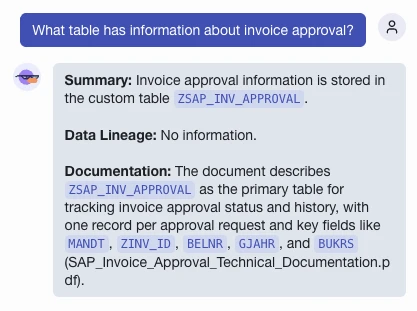 Every on-topic answer is split into Summary, Data Lineage, and Documentation — with the real table and column names inline.
Off-topic questions get a fixed refusal so the assistant stays focused on your data.
Click any answer in chat and Librarian switches to the Lineage tab, highlighting the table or column mentioned in the Summary so you can jump straight from the answer to the graph.
PDF Search with Local Embeddings (RAG)
Upload technical specs, business glossaries, or ERDs and Librarian will search them when answering. Under the hood it’s a small in-browser RAG pipeline: documents are chunked, embedded, and matched against your question. Answers cite the actual page from your data dictionary, not a generic LLM guess. PDFs stay on your machine; only the matched chunks go into the prompt.
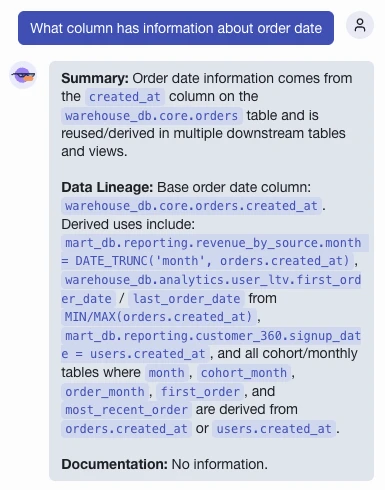 Librarian traces a column across derived tables and views, grounding the answer in your actual lineage.
How it works:
- On first upload, the embedding model (~118 MB) is downloaded once and browser-cached
- Uploaded PDFs are extracted with pdfjs-dist and split into 500-character chunks
- Each chunk is embedded into a vector by the model running in a Web Worker, and stored in memory for the current project
- When you ask a question, it’s embedded the same way and matched against the stored chunks; the closest matches go into the prompt
- 100+ languages supported — works on German, Russian, and other non-English docs
Local-First Architecture: Your Data Stays in the Browser
Everything runs in the browser. The only network call is to the LLM provider you configure.
- Bring your own key — OpenAI, Anthropic, or any OpenAI-compatible endpoint. Keys live in localStorage and are sent only to the configured provider.
- Per-project buckets — chat history, uploaded PDFs, and embedded chunks are scoped to activeProjectId in a Zustand store. Switching projects never leaks one project’s context into another’s prompt.
- RAM-only state — F5 wipes the chat and uploads. Reload starts fresh, which keeps the LLM context predictable.
How Librarian Builds the LLM Prompt
When you send a question, the orchestrator gathers four sources of context:
- Lineage formatted from the current FlowScope analysis
- SQL from the active editor file (truncated to 3000 characters)
- PDF context — your question is embedded and matched against the stored chunks; only the most relevant chunks are sent, not the full documents
- The last 10 chat messages
Try It Out
Librarian is available now at flowscope.pondpilot.io. For the full changelog, see GitHub.
If you run into issues or have feedback, let us know through GitHub Issues or the built-in feedback reporter.